
Hugo is “the world’s fastest framework for building websites”.
Hugo is one of the most popular open-source static site generators. With its amazing speed and flexibility, Hugo makes building websites fun again.
So you have choosen hugo as your framework to build your personal or professional website ?
Good choice !
Why I say that is a good choice ?
- You will stay focus on your main goal: publishing.
- It’s simplier to edit/create your articles. No editor in a webpage that mean no work loosed because you had refreshed the page, or meet a new bug…
You simply use a classic text editor on your laptop. - You will never loose all your work when you will upgrade your hugo version.
I used this framework many years ago for a semi-professional website. 10 years later, after 5 minutes of work in order to make few code migration, this old website was alive again, ready for update. - It’s fast and light (a static website is really difficult to beat).
- Static website did not mean not editable, not responsive, or not interactive
- It’s a cash saver when you will wanna publish your creation on internet.
First step with hugo
I assume that you’re not a beginner, so I didn’t explain those steps. Refer to the official documentation availaible (pretty good) and take time to read many blog about this subject.
Basically, you have to:
- Instal hugo on your laptop
- Choose a theme (take a really simple one if you are a beginner)
- Wrote a post or use few sample availaible in your theme
- Configure your theme with your domain name
- Learn how to use command line
Second step : Use GIT
Save your work and time with git !
Repeat again: You must save your work in a git repository.
So you should have an account on github or another platform, and you created a git repository for your website.
But, what should you put in this repository ?
Everythings that you didn’t wanna loose.
Repeat again: Everythings
I had this directory structure :
| Name | Comment |
|---|---|
| archetypes | Custom preconfigured front matter fields |
| content | All content for the website |
| static | Stores all the static content |
| themes | Theme of the website |
| config.yml | Hugo configuration directives |
| data | Store configuration files used to generate pages |
| resources | Caches some files to speed up generation |
| public | Static generated website |
| docs | Few notes and docs |
| netlify.toml | netlify configuration directives |
| .gitignore | Git ignore configuration |
Personaly, I use a single repository to store code, documentation and final generated website. It’s more simple to use it daily for little or medium sized website.
Adding
resourcesin your git repository will speed up the build time. It’s mandatory if you use responsive images, even if you could adjust the parametertimeoutin your config.yml.
In my .gitignore, I exclude mac-os, visual studio and hugo_build.lock files :
|
|
Third Step : Choose your platform
https://www.netlify.com/pricing/
The starter is free Free
Deploy to global edge network
Live site previews with a collaboration UI for team members
Instant rollbacks to any version
Deploy static assets & dynamic serverless functions
Limit
Bandwidth: 100GB /month
Build minutes: 300 minutes /month
Build time will be saved by doing this part from
- your laptop for start
- github action (I will made a post on this subject)
Docs:
https://docs.netlify.com/
Git https://docs.netlify.com/git/overview/
Build Setting : https://docs.netlify.com/configure-builds/overview/
Domain https://docs.netlify.com/domains-https/custom-domains/
External DNS Provider https://docs.netlify.com/domains-https/custom-domains/configure-external-dns/
Setup HTTPS: https://docs.netlify.com/domains-https/https-ssl/
Wrote, Commit, Build and deploy
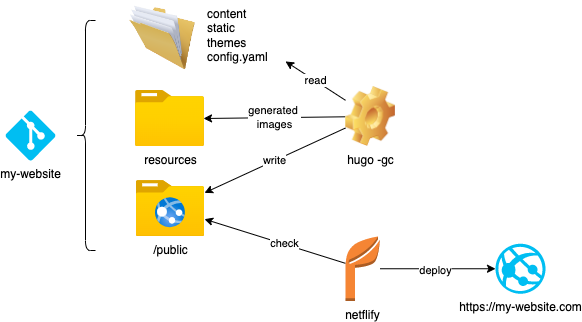
Don’t clean your
publicfolder when you build a new version.
This could delete actual css, or js files actually in use. As Google indexation is not done in real time, you could break lot of things if you delete this kind of files.